> ## Documentation Index
> Fetch the complete documentation index at: https://promptlayer-1023-gorgias-docs.mintlify.site/llms.txt
> Use this file to discover all available pages before exploring further.
# Function Calling
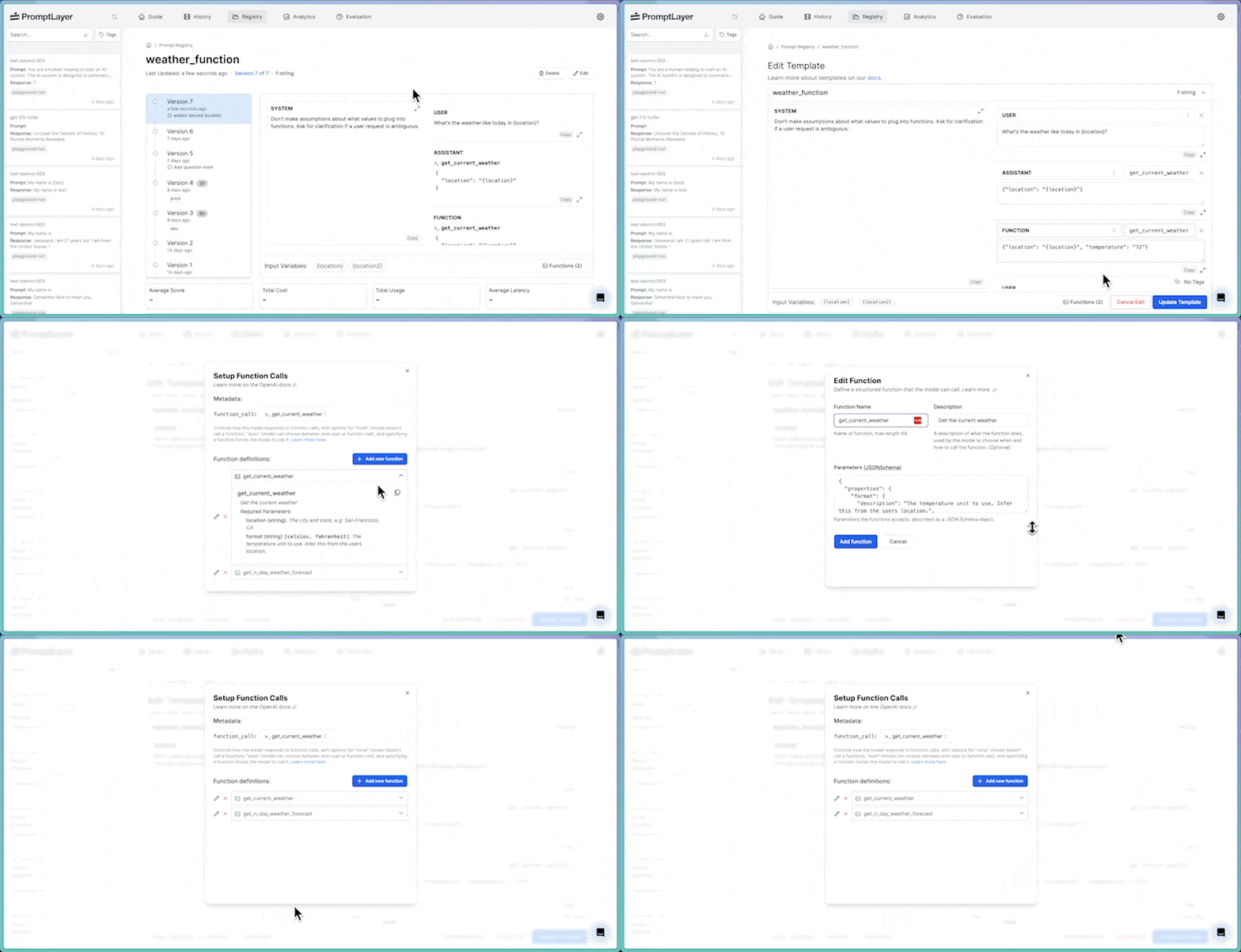
The Prompt Registry supports the [OpenAI functions](https://platform.openai.com/docs/guides/function-calling) format. You can create a prompt using functions both visually and programmatically.
Be sure to read [this OpenAI guide](https://platform.openai.com/docs/guides/function-calling) for more context.
### Creating Visually
Functions can be defined, called, and set up visually through the Prompt Registry.
 ### Publishing Programmatically
To publish a prompt template with functions programatically is very similar to how you would publish a regular prompt template. To add functions you can add the arguments `functions` and `function_call` to your `prompt_template` object.
If you’re already calling OpenAI API, you can bundle the functions and publish it into the Prompt Registry, like this:
```python Python SDK
messages = [{"role": "user", "content": "What's the weather like in Boston?"}]
functions = [
{
"name": "get_current_weather",
"description": "Get the current weather in a given location",
"parameters": {
"type": "object",
"properties": {
"location": {
"type": "string",
"description": "The city and state, e.g. San Francisco, CA",
},
"unit": {"type": "string", "enum": ["celsius", "fahrenheit"]},
},
"required": ["location"],
},
}
]
promptlayer.templates.publish({
"prompt_name": "test_chat_functions",
"prompt_template": {
"type": "chat",
"function_call": "auto",
"messages": [
{
"role": role,
"content": [
{
"type": "text",
"text": content,
}
],
}
for (role, content) in map(lambda x: x.values(), messages)
],
"functions": functions,
}
})
response = openai.ChatCompletion.create(
model="gpt-3.5-turbo",
messages=messages,
functions=functions,
function_call="auto",
)
```
```js JavaScript
const messages = [
{ role: "user", content: "What's the weather like in Boston?" },
];
const functions = [
{
name: "get_current_weather",
description: "Get the current weather in a given location",
parameters: {
type: "object",
properties: {
location: {
type: "string",
description: "The city and state, e.g. San Francisco, CA",
},
unit: { type: "string", enum: ["celsius", "fahrenheit"] },
},
required: ["location"],
},
},
];
promptlayer.templates.publish({
prompt_name: "test_chat_functions",
prompt_template: {
type: "chat",
function_call: "auto",
messages: messages.map(({ role, content }) => ({
role,
content: [
{
type: "text",
text: content,
},
],
})),
functions,
},
});
const response = await openai.completions.create({
model: "gpt-3.5-turbo",
messages,
functions,
function_call: "auto",
});
```
### Publishing Programmatically
To publish a prompt template with functions programatically is very similar to how you would publish a regular prompt template. To add functions you can add the arguments `functions` and `function_call` to your `prompt_template` object.
If you’re already calling OpenAI API, you can bundle the functions and publish it into the Prompt Registry, like this:
```python Python SDK
messages = [{"role": "user", "content": "What's the weather like in Boston?"}]
functions = [
{
"name": "get_current_weather",
"description": "Get the current weather in a given location",
"parameters": {
"type": "object",
"properties": {
"location": {
"type": "string",
"description": "The city and state, e.g. San Francisco, CA",
},
"unit": {"type": "string", "enum": ["celsius", "fahrenheit"]},
},
"required": ["location"],
},
}
]
promptlayer.templates.publish({
"prompt_name": "test_chat_functions",
"prompt_template": {
"type": "chat",
"function_call": "auto",
"messages": [
{
"role": role,
"content": [
{
"type": "text",
"text": content,
}
],
}
for (role, content) in map(lambda x: x.values(), messages)
],
"functions": functions,
}
})
response = openai.ChatCompletion.create(
model="gpt-3.5-turbo",
messages=messages,
functions=functions,
function_call="auto",
)
```
```js JavaScript
const messages = [
{ role: "user", content: "What's the weather like in Boston?" },
];
const functions = [
{
name: "get_current_weather",
description: "Get the current weather in a given location",
parameters: {
type: "object",
properties: {
location: {
type: "string",
description: "The city and state, e.g. San Francisco, CA",
},
unit: { type: "string", enum: ["celsius", "fahrenheit"] },
},
required: ["location"],
},
},
];
promptlayer.templates.publish({
prompt_name: "test_chat_functions",
prompt_template: {
type: "chat",
function_call: "auto",
messages: messages.map(({ role, content }) => ({
role,
content: [
{
type: "text",
text: content,
},
],
})),
functions,
},
});
const response = await openai.completions.create({
model: "gpt-3.5-turbo",
messages,
functions,
function_call: "auto",
});
```